Gaming Dashboards and Data
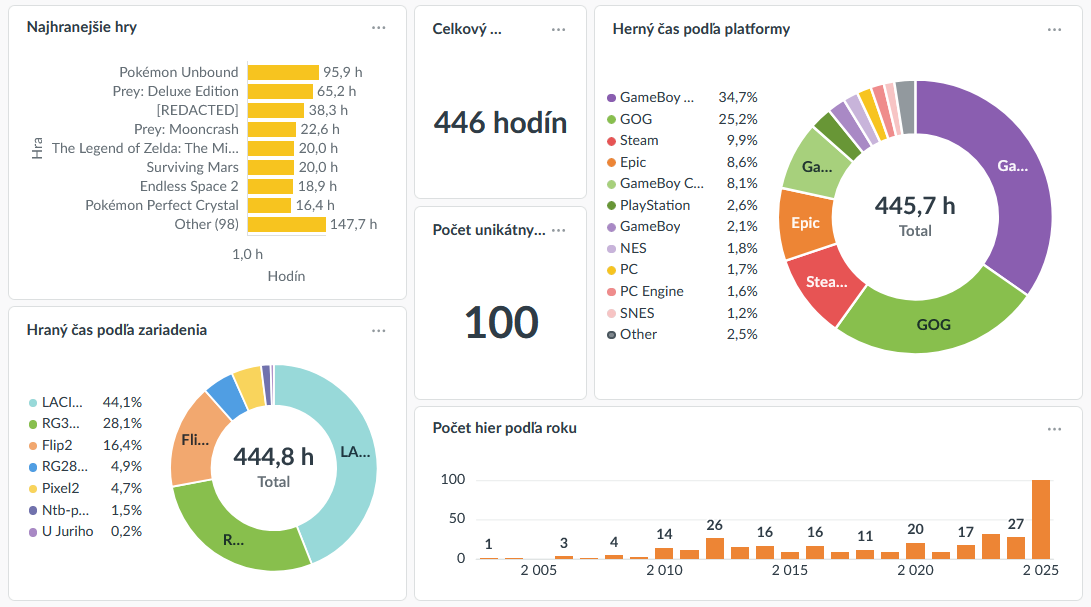
I've built fairly extensive game tracking for myself. I now use it to track my games, purchases, the time I spend playing, and so on.
I've also built specialized dashboards to see details of specific games, devices, or years.
I've always liked the "Year in Review" various services offer - but they're always limited in scope, i.e., Steam will only tell you about Steam games, which for me is not nearly enough. My current solution aggregates play times from everywhere - Steam, GOG, retro games, and some others. How I get the playtime data in there will be the subject of a future post.
The entire thing is built on the stack I described in the post called The Open-Source Basis for my projects, illustrated by the use case of my game catalog.
This post will provide some background and showcase the dashboards.
History and evolution
I don't even remember when I started keeping track of what games I play, but it probably started as a spreadsheet. I then moved it to AirTable, and built a database of all games I owned, not just played - whether they're bought on a CD, downloaded from the net for free, redeemed on a service, or whatever.
Because I've only ever used the free tier of AirTable (I'm not in their target audience, and their pricing is entirely unreasonable for my use case), I've had a major limitation: I could have as many databases as I wanted, but every one must contain under 1200 rows total. So I had 3 DBs for just my games: a list of games I've played, a list of games I had (with their metadata), and a list of purchases. When I moved from AirTable to a self-hosted NocoDB, it was a lot of work to consolidate them into a good data model, but the work paid off.
So now I have these main areas in there:
- A master list of all games
- A game goes in there whenever I want to have it there, regardless of whether I played or bought it
- I always try to add genre tags for every new game. I didn't do this from the start, which resulted in my having hundreds of games in there I knew basically nothing about, aside from their names.
- Whenever a new game is added, metadata of various kinds are downloaded from IGDB. This helps solve the problem of not knowing what's in there. (Though IGDB-defined data, such as genres, are kept separate from the ones I enter manually.)
- For new games, I also used to download HowLongToBeat data. But that integration keeps breaking, because they really don't like us having that data, I guess. I've replaced it with the same kind of data from IGDB, but their dataset is a lot sparser.
- Every time a new game is added, I get all the info I retrieved for it nicely formatted as a Matrix message; it's also slotted into my private newsletter.
- A list of purchases
- I have a simple NocoDB form where I can quickly jot down some basic info for a game - the name, price, purchase location and date.
- When a purchase record is entered, a corresponding record from the master game list is linked to it. If it doesn't exist, it's created automatically, which also triggers the fetching of all metadata.
- A list of game bundles
- If I buy multiple games in a bundle, this is used to group the purchase records together
- I don't really buy games in bundles anymore, so this isn't seeing much use
- A list of games played
- This is a high-level overview of the games I've actually started playing
- It basically says when I started and/or finished, how long I played, whether or not I finished (or dropped) the game, and what platform I played it on.
- For a long time, the play times were just an aggregate I entered manually when I was done with the game, but no longer
- Play sessions
- This did not exist in the AirTable version in any way. It's a granular track of every game session. I.e., "I've played 15 minutes of Hexcells Infinite on my main PC, staring at 18:31 today.
- 99% of these are created automatically via various ingestion methods. (See the future post I mentioned above.)
- All relevant data is automatically indexed in my Universal Personal Search (UPS) for easy discoverability.
That makes it very easy to look up a game and see whether (and when) I bought it, played it, on which devices(s), for how long, etc - whether it's in NocoDB or the UPS. And the latest feature: when a game meets my relevancy criteria, a text note is automatically generated for it in my Joplin notes.
So, basically, that's a whole bunch of data I can slice and dice. Up next:
Dashboards
There are 5 main dashes. 3 are described here, 2 in the next post.
"Gaming Dash" - the games this year
My most used dashboard, this tells me all I want to know about my current year in gaming:
- Which games I've played the most, total time spent playing, total games tried
- What platforms are I played them on: if they're retro games, I use the actual name of the platform (NES, GameBoy Advance, ...); if they're PC games, I mostly use the storefront's name (Steam, GOG, or just 'PC' for the rest)
- There's info on which devices I used (PC, retro handhelds) and for how long
- And info on spending - how much, on which storefront, and when
There's some other things - various kinds of views on the same data, the current year's number of played games compared to the entire previous history, and some others.
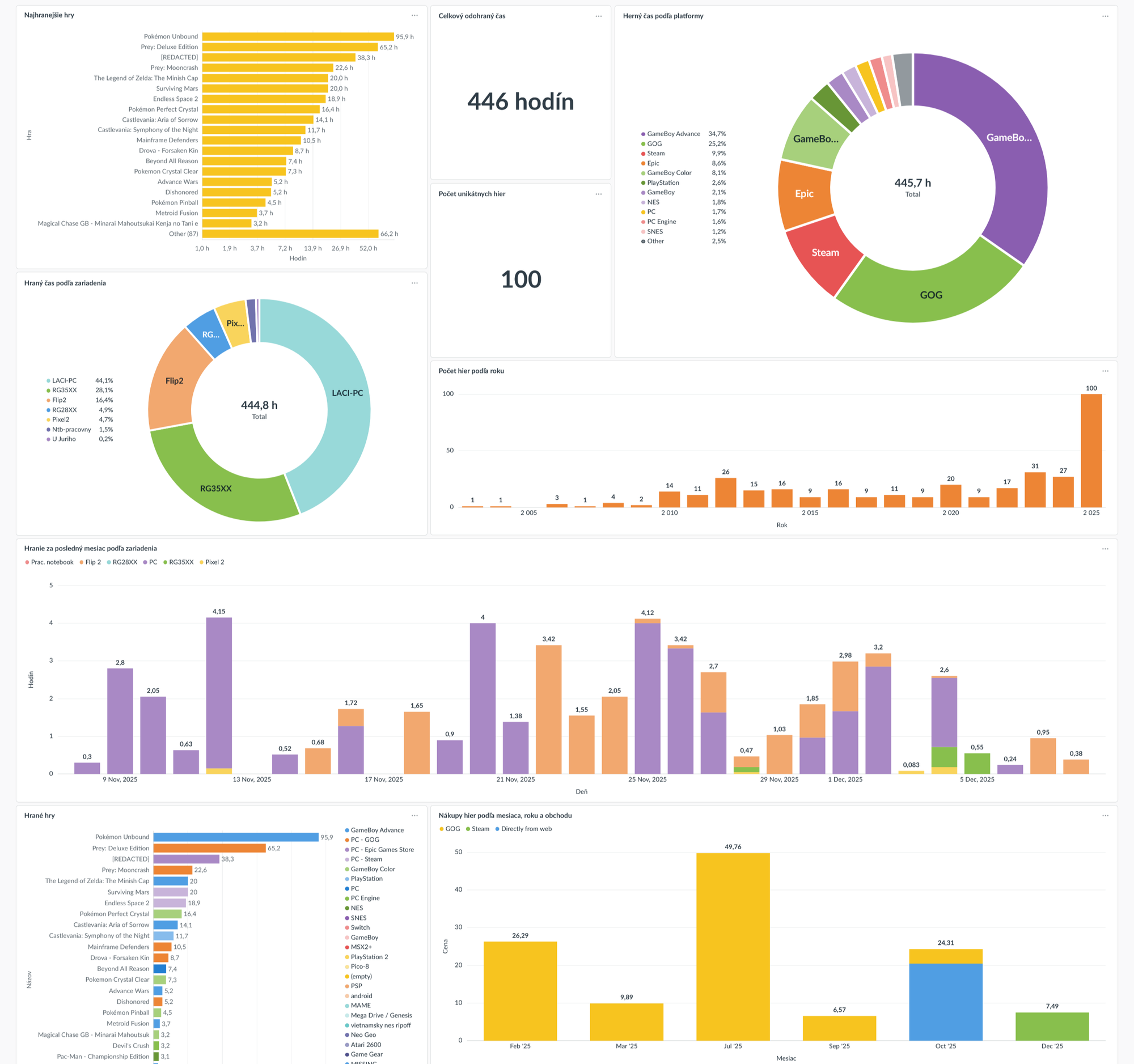
So at a glance, this tells me my recent zeal for Prey almost edged out Unbound as my most played game, or that I still played more GameBoy Advance games than any other single platform (but if you lumped together all PC things, including GOG, Steam and Epic, those would win). I see that my RG35xx is the second most-used device, even though I haven't touched it much in the past month - I've used the PC and my Flip 2 the most.
Apparently, I've tried 100 games this year - and the year's not even done yet! - up from the previous record of 31. Though that's largely down to a combination of two factors: I've been trying a bunch of retro games these past few years, but this time around, I also have my new tracking system, so every game I've tried for maybe 10 minutes or more gets counted in there automatically.
Year in Review
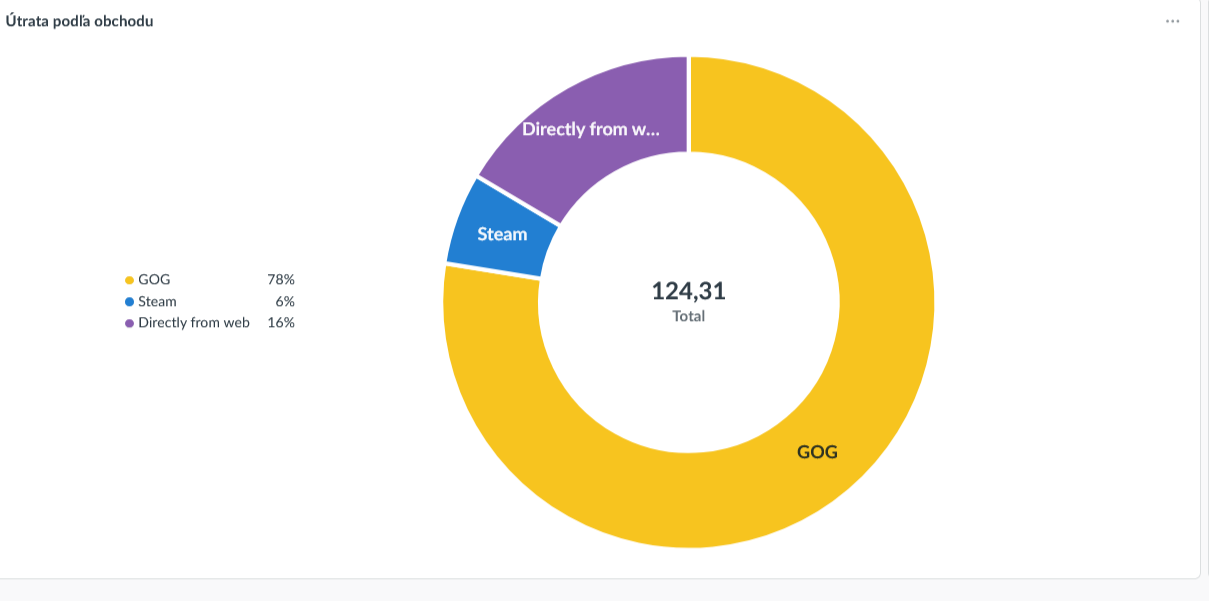
This is, in fact, quite similar and reuses many components of the previous one. This one shows aggregate data for the entire year, with no exceptions.
Since this is done in Metabase and the boards are very easily parametrizable, it doesn't actually have to be a year - any time interval is okay.
And that's the main difference between this and the previous one, which is built as a summary of the current year with whatever extra is needed: e.g. the number of games per year is displayed for the entire history, the time-per-day-per-device is always displayed for the past 30 days, etc.
In this one, however, everything matches the specified time range. One of the most useful (slash enjoyable) things for me has been the device utilization chart in the middle - it shows me at a glance how they changed over time. I can easily see that I really got a lot of mileage from the RG35XX (gray) in the first half of the year, but then it was mostly replaced by Flip 2 - and the PC, because I started playing Prey a lot.
In that chart, the colors representing the retro consoles are matched to their actual color. 😀
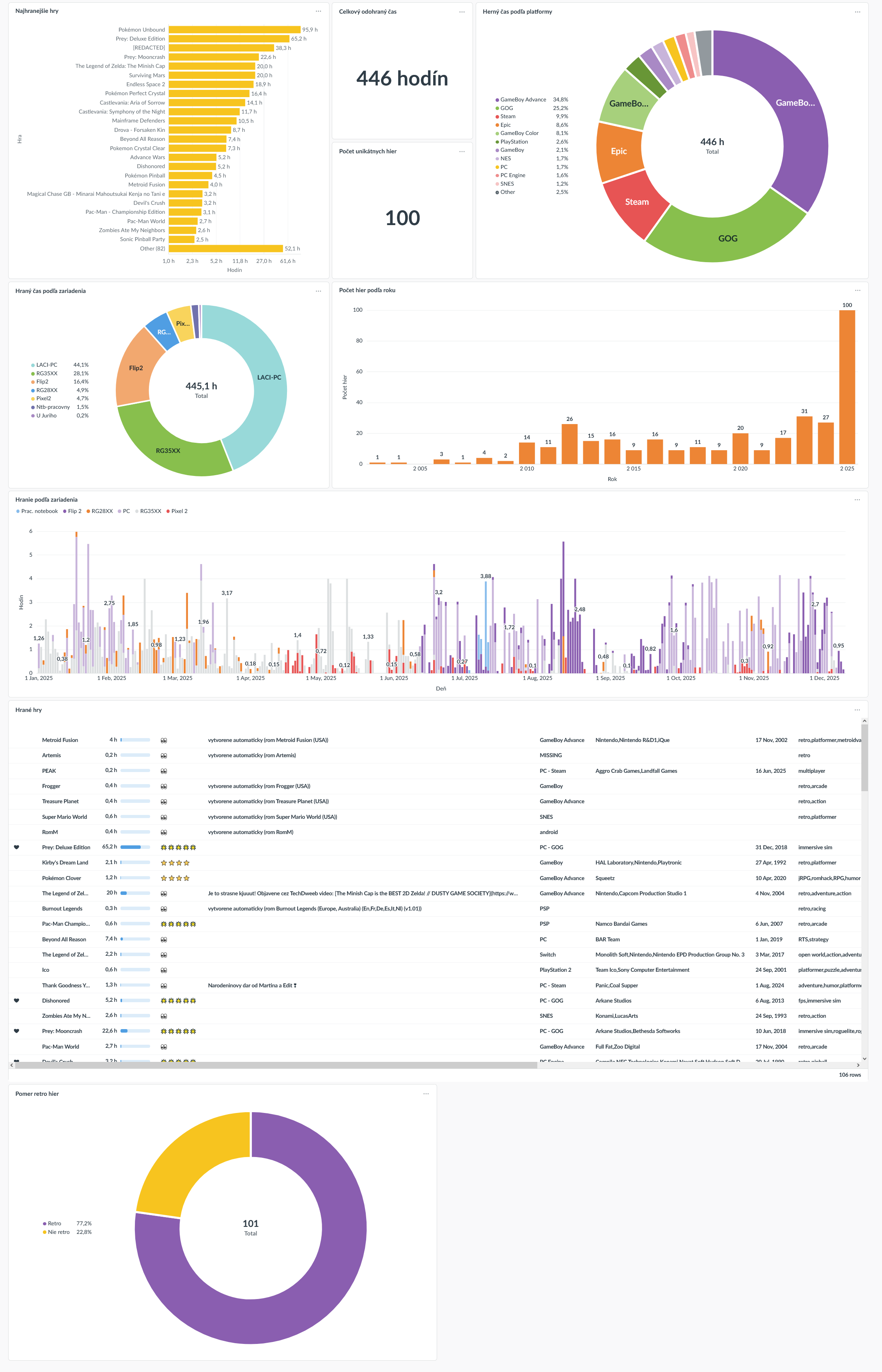
The last one shows how many games are 'retro' - 77% is quite a jump from the previous year's 18%.
And just now I realized it'd also be useful to see not the percentage of retro games, but how much of my playtime was spent on retro games. I'll add that next.
Global Overview
Last and definitely least, there's the global overview. As the name implies, it summarizes the entire history. For now, there's only two kinds of info: purchases and number of games played.
It does show some trends - such as the fact that I bought a lot of stuff from Humble Bundle, then stopped; and almost all my spending in recent years is on GOG.
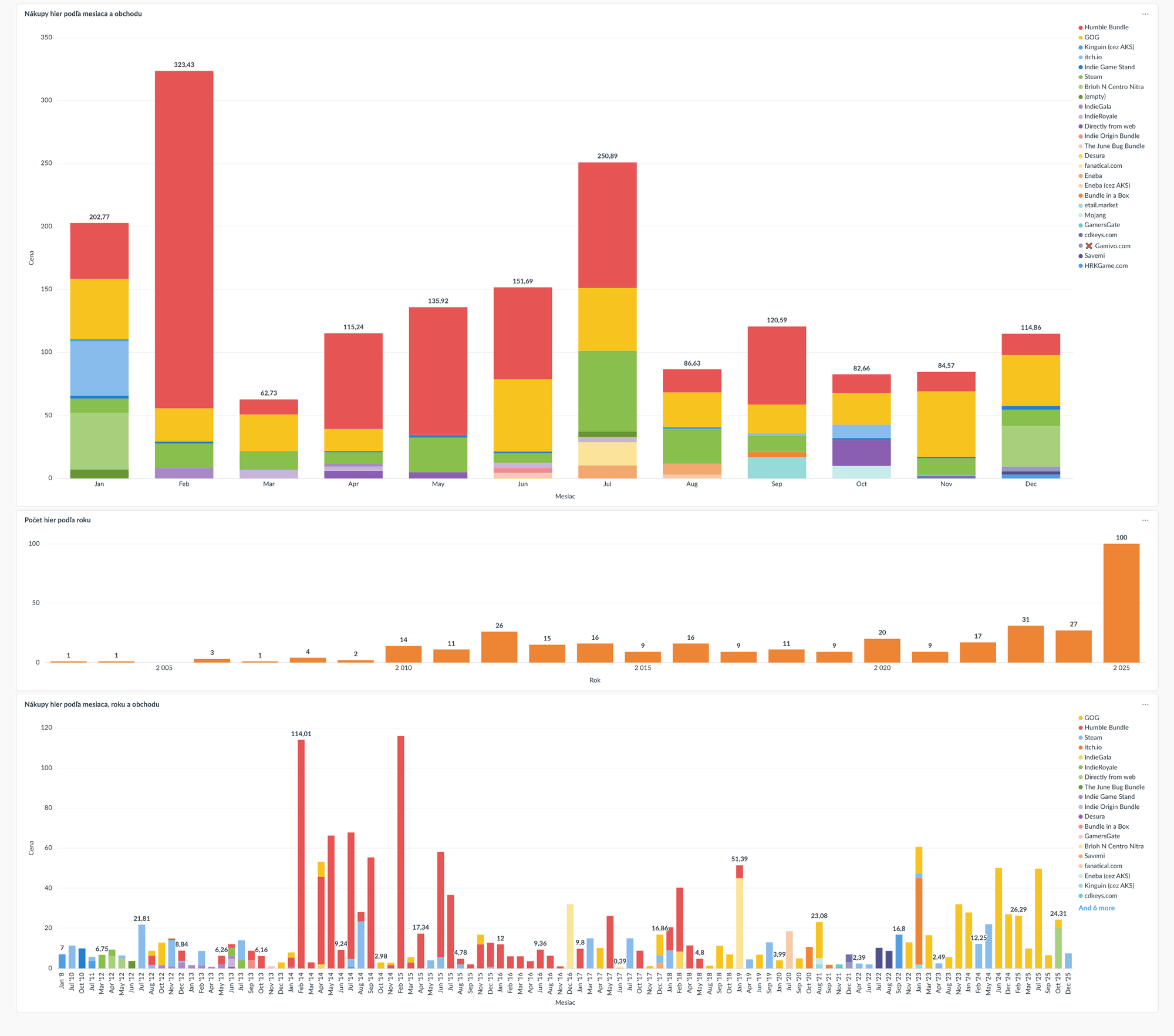
I may want to add a couple more: time spent playing per year (or quarter), for example. I sometimes set a new year's goal to play more games than before, so it might be nice to see how that's going. But the utility there will also be limited by the relative sparsity of data, the farther into the past I go.
Another one I want, but haven't yet figured out, is how my genre preferences evolved over time. I think I may make it a chart with the top 20 genre tags for each year, represented as the percentage of my total play time that year? Summing to 100% every year, of course. That might let me see some general trends. I'll have to think about that some more.
That's it for now. See you in the next one! It'll say more about how I import the play session info, and show two more dashboards.

Comments ()